Launch day goes well for about six minutes.
A campaign email lands, people click through, and your app starts taking traffic. One server gets slammed first because it was already warm, had the right cached data, or just happened to sit behind the one entry point your clients were using. Meanwhile, other servers are healthy and mostly idle. Users don't care why that happened. They just see timeouts, broken checkouts, and refresh buttons that stop working.
That's the moment you stop thinking of infrastructure as a pile of servers and start thinking in terms of traffic flow. If requests arrive like cars, you need more than extra parking spaces. You need ramps, lane control, detours, and someone deciding where vehicles should go when one road is blocked.
Table of Contents
- Introduction to Load Balancing in the Cloud
- How Cloud Load Balancing Works Behind the Scenes
- Understanding L4 and L7 Load Balancing Differences
- Global Versus Regional Architectures and Hybrid Challenges
- How Autoscaling and Performance Interact With Load Balancers
- Testing and Validating Your Cloud Load Balancing Setup
- Key Takeaways for Choosing Your Cloud Load Balancing Strategy
Introduction to Load Balancing in the Cloud
Load balancing in the cloud is the control layer that spreads incoming traffic across multiple compute targets so one machine doesn't become the single point of pain. In practice, that means your users hit a stable frontend address while the load balancer decides which backend instance, container, or service should receive each request.
Cloud platforms made this pattern normal. Amazon launched Elastic Load Balancing on 18 May 2009 alongside CloudWatch and Auto Scaling, then added cross-zone load balancing on 6 Nov 2013, and later introduced the Application Load Balancer in 2016 for Layer 7 routing with host and path rules, WebSockets, and HTTP/2 support, as reflected in this cloud service history reference. That evolution matters because it tracks the shift from “send traffic to several instances” to “route traffic intelligently inside elastic, cloud-native systems.”
A junior engineer often thinks the problem is only volume. It usually isn't. The problem is unevenness.
One backend may be slow because of cold startup time. Another may be fine but sitting in a different Availability Zone. A third may be healthy for simple checks but bad at serving real user traffic. The balancing layer exists to keep those differences from turning into an outage.
Why a single endpoint changes everything
A good balancer gives you one stable place to receive traffic while everything behind it can change. Servers can come and go. Containers can restart. A deployment can drain old connections and shift new ones elsewhere. Users don't need to know.
That's why load balancing sits underneath several goals at once:
- Availability: If one target fails, traffic can move away from it.
- Elasticity: New capacity can join the pool without changing the public entry point.
- User experience: Requests are less likely to pile onto one overloaded backend.
- Operational safety: Teams can patch, deploy, or replace instances with less disruption.
Practical rule: If your service can scale beyond one instance, it needs a balancing layer before it needs a bigger instance.
The rest of the job is learning what kind of balancer you need, where to place it, and how to prove it's doing what you think it's doing.
How Cloud Load Balancing Works Behind the Scenes
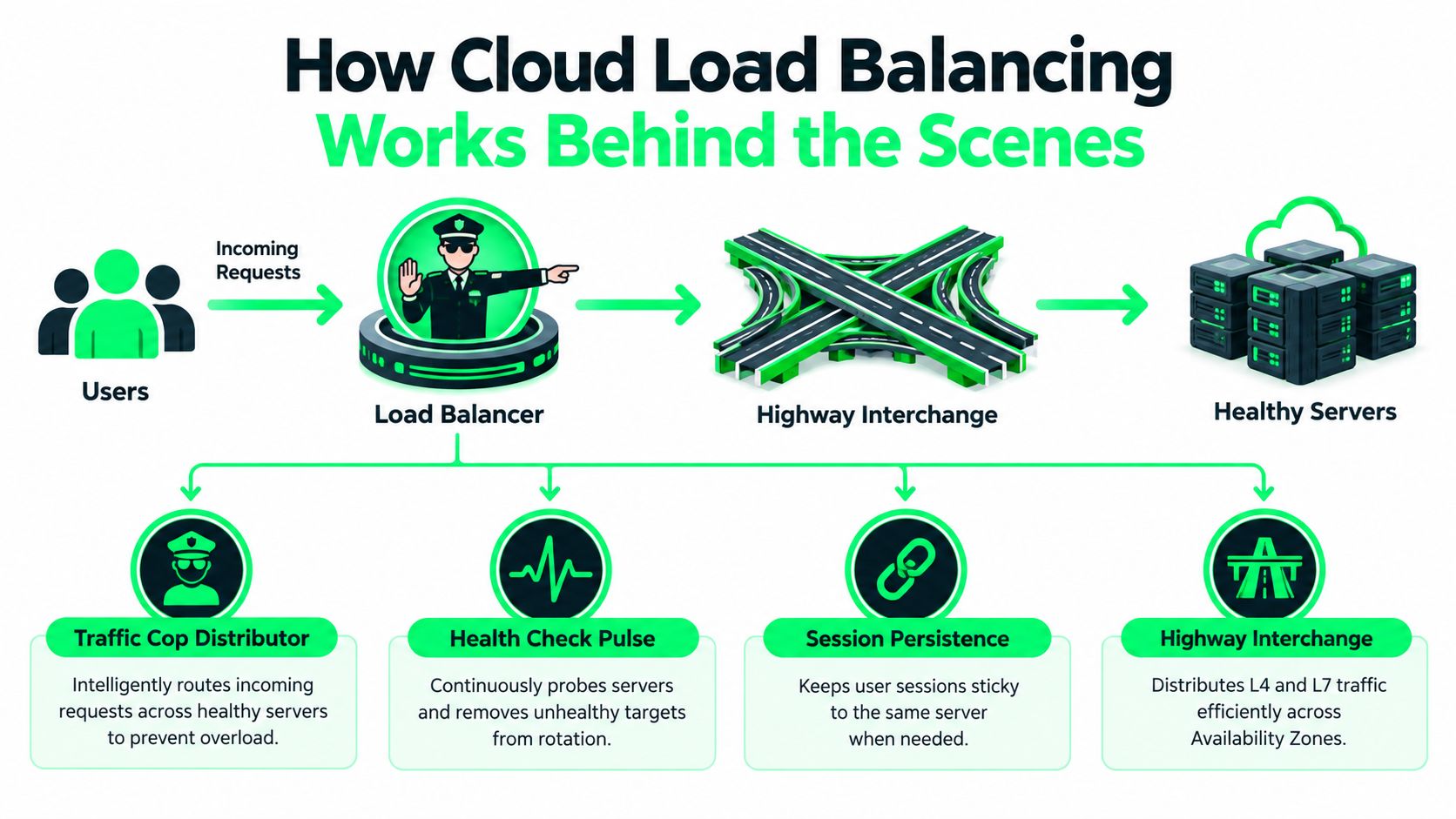
Think of the load balancer as a traffic cop standing at a highway interchange. Cars arrive from many directions. The cop doesn't build the roads or drive the cars. The cop decides which open lane each car should enter so one lane doesn't lock up while another sits empty.
The basic request path
When a user sends a request, it first hits the load balancer. The balancer checks its list of available targets, applies its routing logic, and forwards the request to one backend. That backend might be a virtual machine, a container, a Kubernetes service, or an application process exposed through a target group.
The key idea is simple. Clients don't choose the backend. The balancer does.
Behind that simple idea are a few moving parts:
- Healthy target pool: The balancer keeps a list of backends that are eligible to receive traffic.
- Selection policy: It uses a rule to pick one target for the next request or connection.
- Feedback loop: It keeps checking whether each target is still safe to use.
- Return path: The response comes back through the expected network path so the client sees a single coherent service.
Health checks and why they matter
A backend being “up” doesn't always mean it's useful. A process can answer a low-level probe and still fail real work. That's why health checks matter so much. The balancer sends periodic checks and removes unhealthy targets from rotation when they stop meeting the rule.
If you've ever wondered why users still hit a broken server “for a little while,” it's often because health checking and traffic removal aren't instantaneous. There's a timing window between detection and full drain.
A load balancer is only as smart as its health signal. If the check is shallow, traffic decisions will be shallow too.
You also need to think about connection draining. If a backend is being removed during a deployment, you usually don't want to cut off active requests mid-flight. Draining lets existing work finish while new requests go elsewhere.
This short walkthrough helps if you want a quick visual explanation before reading on:
Availability Zones and traffic spread
Cloud systems often run across multiple Availability Zones inside one region. A balancer can spread traffic across those zones so one zone doesn't become a hidden bottleneck. That protects you from a narrower class of failure than global routing, but it's still important because many incidents start as “one subset of capacity is sick.”
Some workloads also need session persistence, sometimes called sticky sessions. That means the balancer tries to keep a user on the same backend for a period of time. It's useful when the application stores session state locally, though in many modern designs teams try to reduce that dependency.
Here's the mental model I teach new SREs:
- A request arrives at a single front door.
- The balancer checks the map of healthy places it can send that request.
- It applies a rule and forwards the traffic.
- It keeps watching for backend health changes.
- It drains gracefully when a backend needs to leave.
Once that model feels natural, the next question becomes more precise. What exactly is the balancer looking at when it makes the decision?
Understanding L4 and L7 Load Balancing Differences
The shortest useful distinction is this: L4 load balancing looks at connection-level information, while L7 load balancing looks at application-level request content.
That sounds abstract until you tie it to what each one can see.
What each layer can see
At Layer 4, the balancer works with transport details such as TCP or UDP. It can route based on things like protocol and port, and it's often a good fit when you need fast distribution for traffic that doesn't require understanding the contents of an HTTP request.
At Layer 7, the balancer understands application protocols like HTTP and HTTPS. It can inspect request details such as hostnames, URL paths, headers, and sometimes cookies. If you need a frontend that sends /api to one service and /images to another, that's an L7 job. If you want a deeper refresher on application-layer behavior, this Layer 7 glossary entry is a useful companion.
L4 and L7 in everyday examples
A game server using long-lived transport connections may benefit from a simpler L4 approach when the application doesn't need content-aware routing. The balancer's job is mostly to distribute connections cleanly and stay out of the way.
An API gateway is different. Suppose app.example and admin.example land on the same public endpoint, but they should reach different backend services. Or suppose /billing must go to a more tightly controlled application pool than /static. That's where L7 routing earns its keep.
Rule of thumb: Choose L4 when you care most about connection distribution. Choose L7 when you need routing decisions based on what the request says, not just where it arrived.
L4 vs L7 Load Balancing at a Glance
| Feature | L4 Load Balancing | L7 Load Balancing |
|---|---|---|
| What it sees | Transport-layer connection details | Application-layer request details |
| Typical protocols | TCP, UDP | HTTP, HTTPS |
| Routing basis | Connection and port information | Host, path, header, cookie, and other HTTP-aware rules |
| Best fit | Simple, high-volume connection distribution | Web apps, APIs, and content-aware service routing |
| Operational trade-off | Less application awareness | More flexible policy and request handling |
Where engineers get tripped up
The common mistake is treating L7 as “better” and L4 as “older.” That's the wrong frame. They solve different problems.
Another mistake is forgetting connection behavior. If your application uses long-lived connections, an L4 design can still create skew if the traffic pattern causes a few backends to hold the busiest sessions. In those cases, request-aware behavior may matter more than the acronym on the product page.
Use the layer that matches the thing you need to control. Don't buy complexity you won't use, and don't expect a simple connection spreader to understand application intent.
Global Versus Regional Architectures and Hybrid Challenges
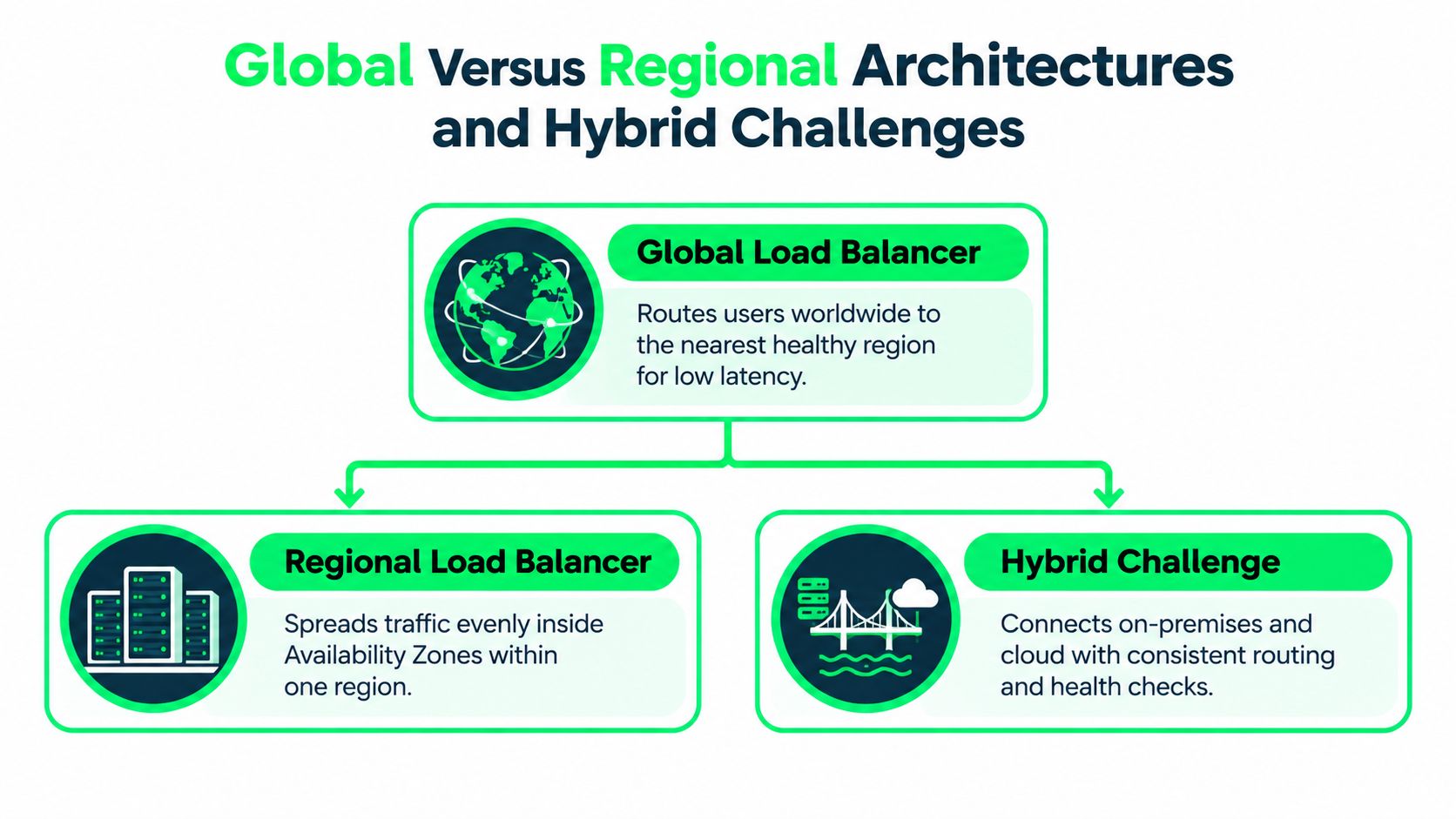
Regional load balancing answers one question well. How do I spread traffic within a single region? Global load balancing answers a different one. Which region should serve this user in the first place?
That difference changes your failure model.
Regional design and local resilience
A regional design usually keeps traffic inside one cloud region and spreads requests across multiple Availability Zones. This is often enough for internal tools, single-market applications, or systems where data locality matters more than worldwide reach.
Regional balancing is easier to reason about because the network path is shorter and the operational boundaries are clearer. Your health checks, target groups, and scaling events all stay inside one failure domain.
A simple way to think about it is this:
- Regional balancing protects you from instance failure and often zone-level imbalance.
- It doesn't automatically protect you from a full regional outage or large geographic latency differences.
Global design and user proximity
A global architecture sits above individual regions and decides where a user should land. Depending on the platform, that might involve DNS-based routing, anycast-style entry points, or edge-integrated traffic steering. The exact mechanism differs, but the intent is the same: send users to a healthy region that can serve them well.
This matters when your audience is spread across countries, or when you need regional failover without asking users to change anything. A nearby healthy region usually gives better latency than a faraway one, and a working region is always better than a dead one.
Recent coverage also shows that the field is moving toward more distributed operation across central data centers and edge servers, with deeper integration into service meshes such as Istio. The same trend note points to a concrete platform signal: Google Cloud expanded its URL map limit from 64 KB/128 KB to 1 MB in a 2026 release note, which suggests real deployments are handling more complex routing policies and larger configurations, as described in these load balancing trends for 2026.
The hybrid and multi-cloud mess
Hybrid and multi-cloud design is where many neat diagrams break down. Native cloud balancers are convenient, but they usually speak the language of one provider first. Policy naming, health-check behavior, observability, and cost models often vary enough that “same architecture” across clouds becomes harder than expected.
That friction shows up in buyer pain. One industry survey found the biggest pain points with native cloud load balancing were skills gaps at 32.2%, cost management at 20.4%, cloud-provider lock-in from lack of multi-cloud support at 9.9%, and lack of advanced features called out by 22% of respondents, according to this hybrid and multi-cloud load balancing survey.
If you run in more than one cloud, the hard part usually isn't adding another balancer. It's keeping routing policy, governance, and cost visibility consistent across environments.
A practical decision flow looks like this:
- Choose regional first when your users, data, and compliance boundaries are mostly local.
- Choose global when latency geography and regional failover matter to the business.
- Plan hybrid early if on-premises systems or multiple clouds are part of the roadmap, because portability is easier to design in than bolt on later.
How Autoscaling and Performance Interact With Load Balancers
Autoscaling and load balancing are often drawn as separate boxes. In operations, they behave like a coupled system. One decides where traffic goes. The other decides how much capacity exists to receive it.
If those two loops disagree, users feel it immediately.
The scaling loop in real life
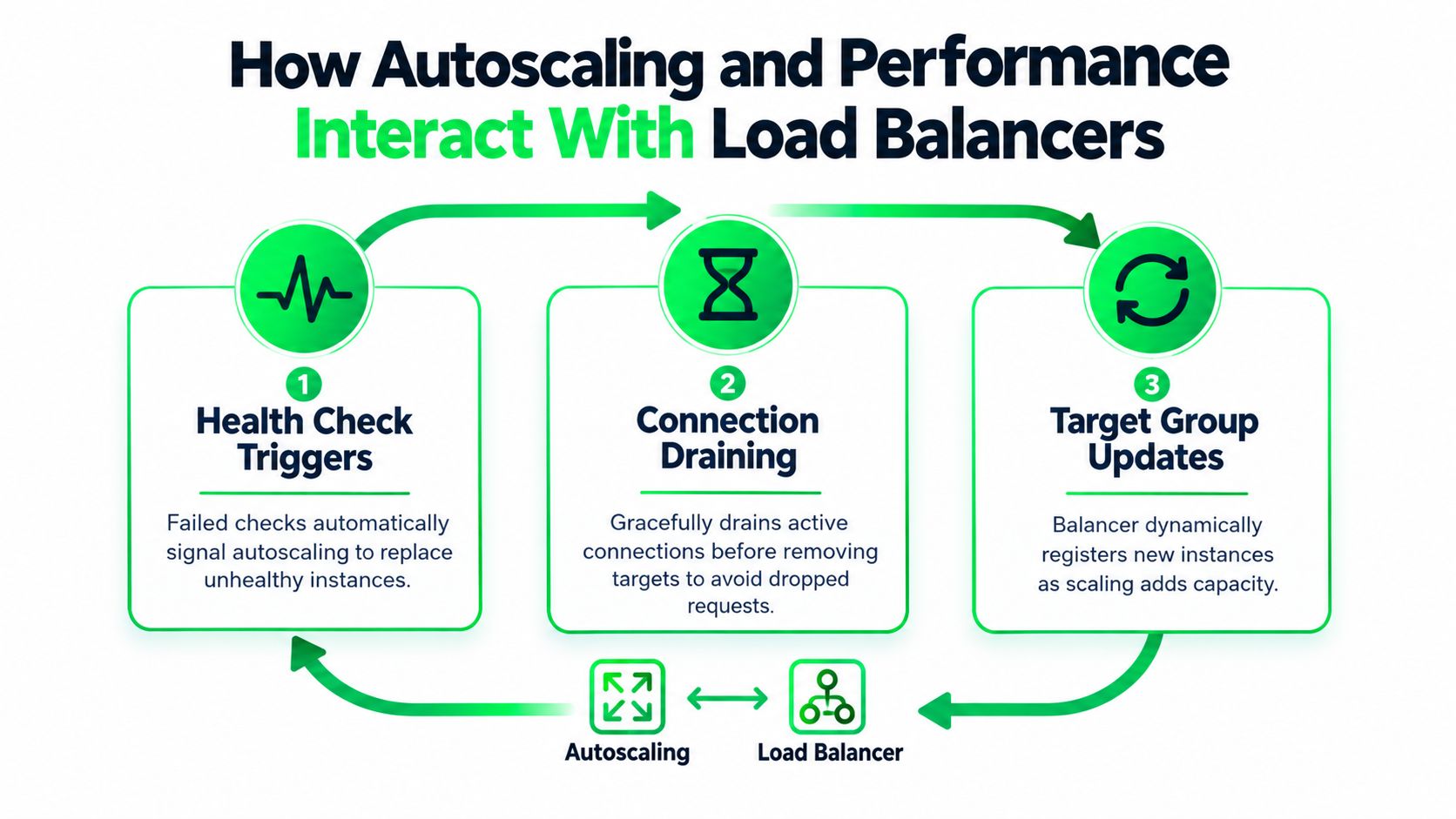
A healthy scaling loop usually works like this. Demand rises, the platform launches new instances or pods, the balancer registers them, health checks pass, and only then should those targets start receiving meaningful traffic. On the way down, the reverse should happen with care. Stop sending new work first, let in-flight requests finish, then remove capacity.
This is why connection draining and target registration timing matter so much. If you scale in too aggressively, you cut off active sessions. If you scale out but send traffic before the app is ready, you create fresh errors with your new capacity.
For burst-heavy systems, the timing problem gets sharper. Teams working on autoscaling bursty data pipelines often run into the same pattern you see in web systems: scaling signals may arrive later than the traffic spike, so the balancer and autoscaler need warm-up logic, readiness checks, and enough headroom to absorb sudden demand.
Datapath architecture matters more than many teams expect
Engineers love debating balancing algorithms. Round robin or least connections. Sticky or not sticky. Those choices matter, but the datapath can matter more.
One evaluation of a next-generation cloud load balancer reported 16% lower latency, nearly 3× higher throughput, and 10× better new-connection establishment at the same load balancer resource level when the balancer moved off the TCP connection datapath, according to this cloud load balancer datapath evaluation. That's a strong reminder that where the balancer sits in the traffic path can dominate performance outcomes.
Placement matters inside service meshes too. A comparative study summarized in Google Cloud load balancing documentation found lookaside load balancing achieved similar latency and load distribution to client-side load balancing while using less CPU and memory. It also measured about 0.56 ms faster 95th-percentile response time than sidecar-based balancing and 2.64 ms faster than proxy-based balancing. Reducing in-path proxy work lowered tail latency under load.
Operational takeaway: Before tuning algorithms, check whether your design is forcing too much traffic through the wrong proxy layer.
What to validate during tuning
When I review a system, I want answers to four questions:
- Can new capacity join cleanly without receiving traffic too early?
- Can old capacity leave cleanly without dropping long-lived requests?
- Does the balancer add avoidable latency because of where it sits in the datapath?
- Does scaling policy match traffic shape, especially during short spikes?
If you need to generate controlled traffic for that kind of validation, platforms such as distributed load testing workflows can help teams replay realistic patterns across regions instead of relying only on simple synthetic ramps.
Testing and Validating Your Cloud Load Balancing Setup
Most balancing setups look fine in diagrams. Problems show up when health checks flap, one zone gets slower than the others, or a backend returns partial failures the balancer doesn't recognize.
Validation needs to be deliberate.
Start with checks before load
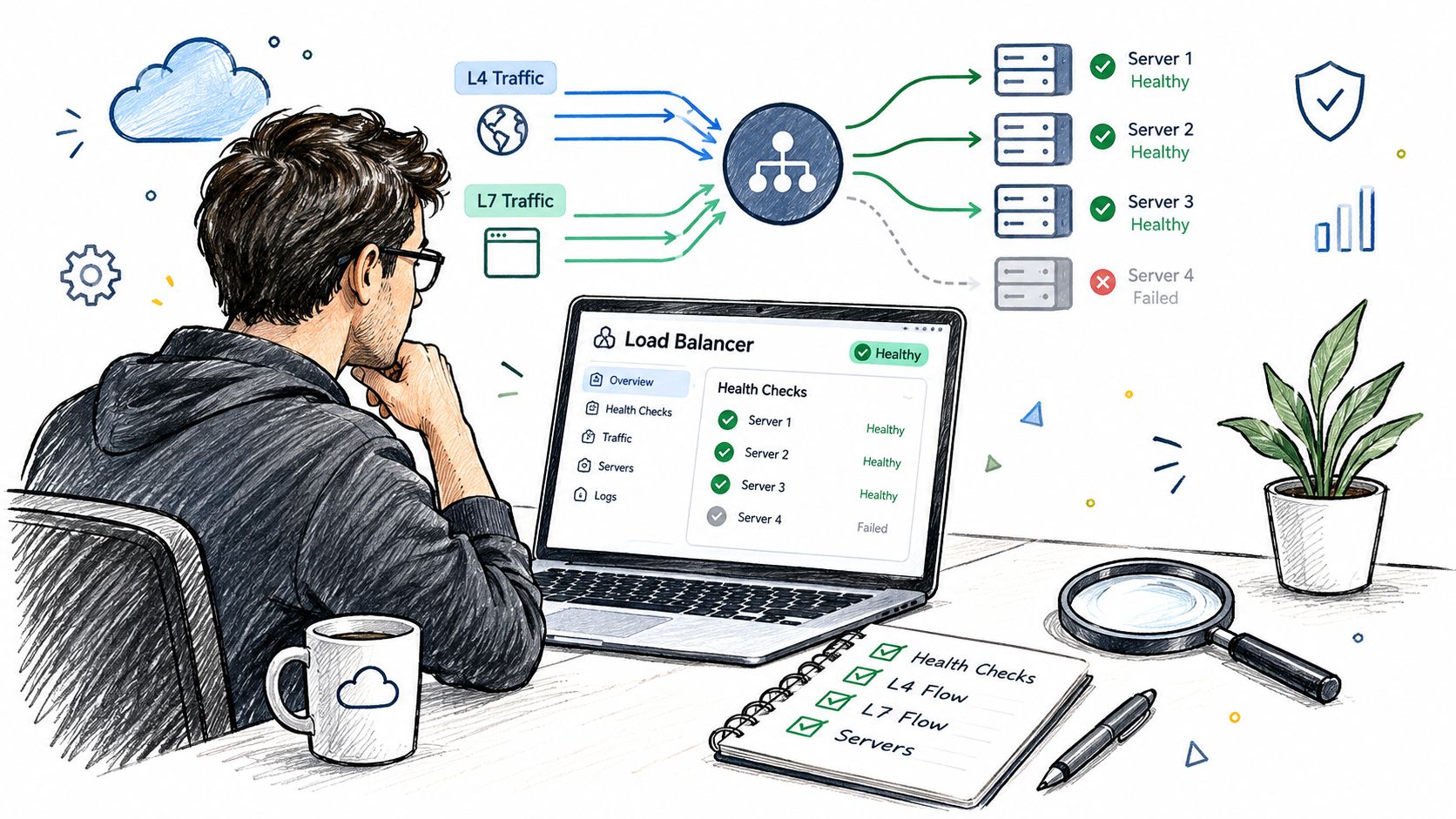
Before generating any pressure, verify the simple mechanics.
- Probe the health endpoint: Don't settle for a check that only proves the process is listening. Make sure it reflects dependency readiness where appropriate.
- Confirm registration timing: Watch a new target from launch to healthy state. You want to know exactly when the balancer starts trusting it.
- Exercise drain behavior: Remove a healthy target on purpose and observe whether active requests finish cleanly.
A lot of timeout incidents come from this layer. If you're chasing intermittent edge failures, this guide to gateway timeout troubleshooting is a practical reference because it helps separate upstream slowness from balancer behavior.
Test like your users behave
Don't only run a smooth traffic ramp. Real systems get bursts, retries, long-lived sessions, uneven request mixes, and weird client behavior after errors. Your test should reflect that.
Use both connection-oriented and request-oriented patterns when relevant. An API frontend might need HTTP-aware tests for path routing and header handling. A stateful transport service may need L4 tests that hold connections open and reveal imbalance over time.
That's where deterministic replay becomes useful. Instead of guessing what “realistic” means, capture representative traffic from an incident or a production session, then replay it in a controlled environment. For failover-specific scenarios, this walkthrough on how to test load balancer failover under real traffic is worth reading.
Watch outcomes, not just averages
During tests, teams often stare at average latency and overlook the critical performance issues. Averages can look fine while a small but painful slice of users gets terrible response times.
Watch for:
- Tail latency: The slow end of the distribution tells you whether contention or proxy overhead is hurting users.
- Traffic distribution: Check whether requests or connections are landing where you expect.
- Error shape: Note whether failures cluster during scale-out, scale-in, or backend replacement.
- Recovery behavior: A healthy system doesn't just fail over. It stabilizes quickly after failover.
One practical option for this style of validation is RETRO//STRESS, which supports Layer 4 and Layer 7 testing plus capture-to-replay workflows so teams can turn observed traffic into repeatable validation runs.
Good validation isn't just "can it handle load?" It's "does it fail the way we planned, recover the way we planned, and keep doing that after every change?"
Run these tests repeatedly, not once. Balancing policy drifts over time as applications, routing rules, and autoscaling thresholds change.
Key Takeaways for Choosing Your Cloud Load Balancing Strategy
The easiest way to choose a strategy is to stop asking for the "best" load balancer and start asking what traffic problem you need to solve.
A short decision checklist
If your main problem is spreading connections cleanly, start by evaluating L4. If your main problem is routing based on request content, start with L7.
If your users mostly live near one deployment footprint, a regional architecture may be enough. If users are widely distributed or business continuity depends on regional failover, think global first.
If more than one cloud or on-premises integration is part of the plan, design for operational consistency early. Routing is only one part of the job. Health signals, observability, policy management, and cost visibility matter just as much.
What strong designs usually have in common
The strongest cloud balancing setups usually share a few traits:
- Clear health signals that reflect whether a backend is ready to serve.
- Graceful join and drain behavior so scaling events don't create their own outages.
- A layer choice that matches the workload instead of chasing feature lists.
- Validation under realistic traffic so architecture claims are backed by evidence.
The broader market growth shows how central this capability has become. One estimate puts the global cloud load balancing market at $5.2 billion in 2025 and projects $14.8 billion by 2034 with an 18.3% CAGR, while other market estimates also project strong growth across adjacent load balancer categories, as summarized in this cloud load balancing market report. You don't need the market numbers to run a good service, but they do underline one point: this isn't a niche networking feature anymore. It's core infrastructure.
Choose the simplest design that meets your traffic shape today, then test it hard enough that you trust it under tomorrow's conditions.
If you're validating how your load balancer behaves under real failure and traffic conditions, RETRO//STRESS gives SRE and DevOps teams a way to run authorized Layer 4 and Layer 7 tests, replay captured traffic patterns, and automate repeatable checks through the web panel, API, or CLI. That makes it useful when you want to move from “the diagram looks right” to evidence that your balancing and failover logic holds up.